Random password generator
All Control Panel sections that allow you to choose passwords for accessing the Control Panel, FTP service, MySQL databases, or email accounts have an automatic password generator available. Its purpose is to help you set secure passwords that are hard to guess or brute-force. You can store these passwords in a password manager software or in the programs that you use to access the services, or you can write them down, depending on your personal preference. The passwords generated by this tool are strong enough to be used with our service.
To start the tool, you need to click the Generate button inside the Password field.

The password generator allows you to choose between three different types of passwords:
- Random: Totally random passwords that consist of small and capital Latin letters, digits, and 32 special symbols.
- Pronounceable: The passwords consist of small Latin letters only.
- Passphrase: The passwords consist of words in English separated by spaces.
You can choose the length of the passwords. Even the shortest passwords generated by the tool are considered secure. If you plan to store the passwords in software that runs on your device, you can choose longer passwords. If you plan to enter them periodically by hand, you may consider using shorter passwords for convenience.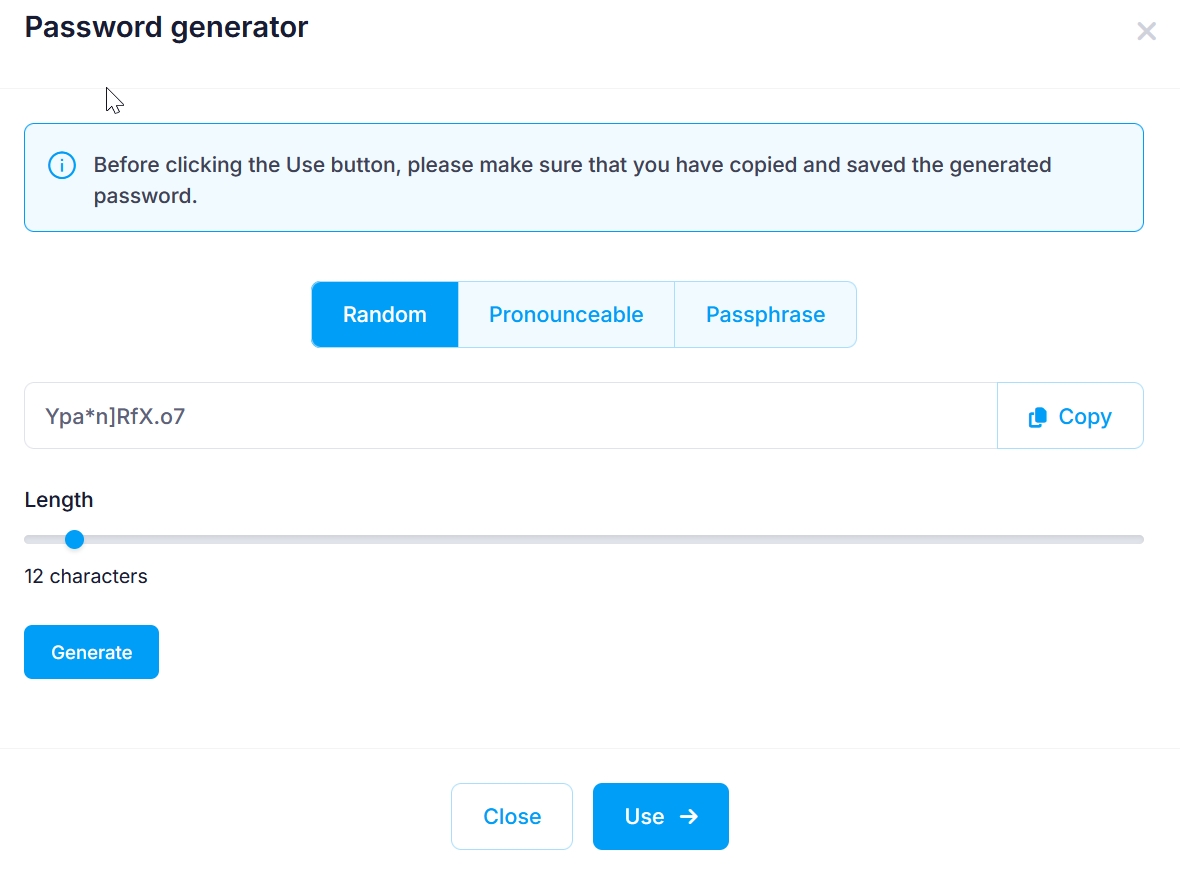
Once you have selected a password, you need to copy it to your clipboard or write it down. Then, click the Use button to populate the Password/Confirm Password fields with it, and proceed with filling the form you were using.
If you decide not to use the tool to generate a password, click on the Close or X buttons.